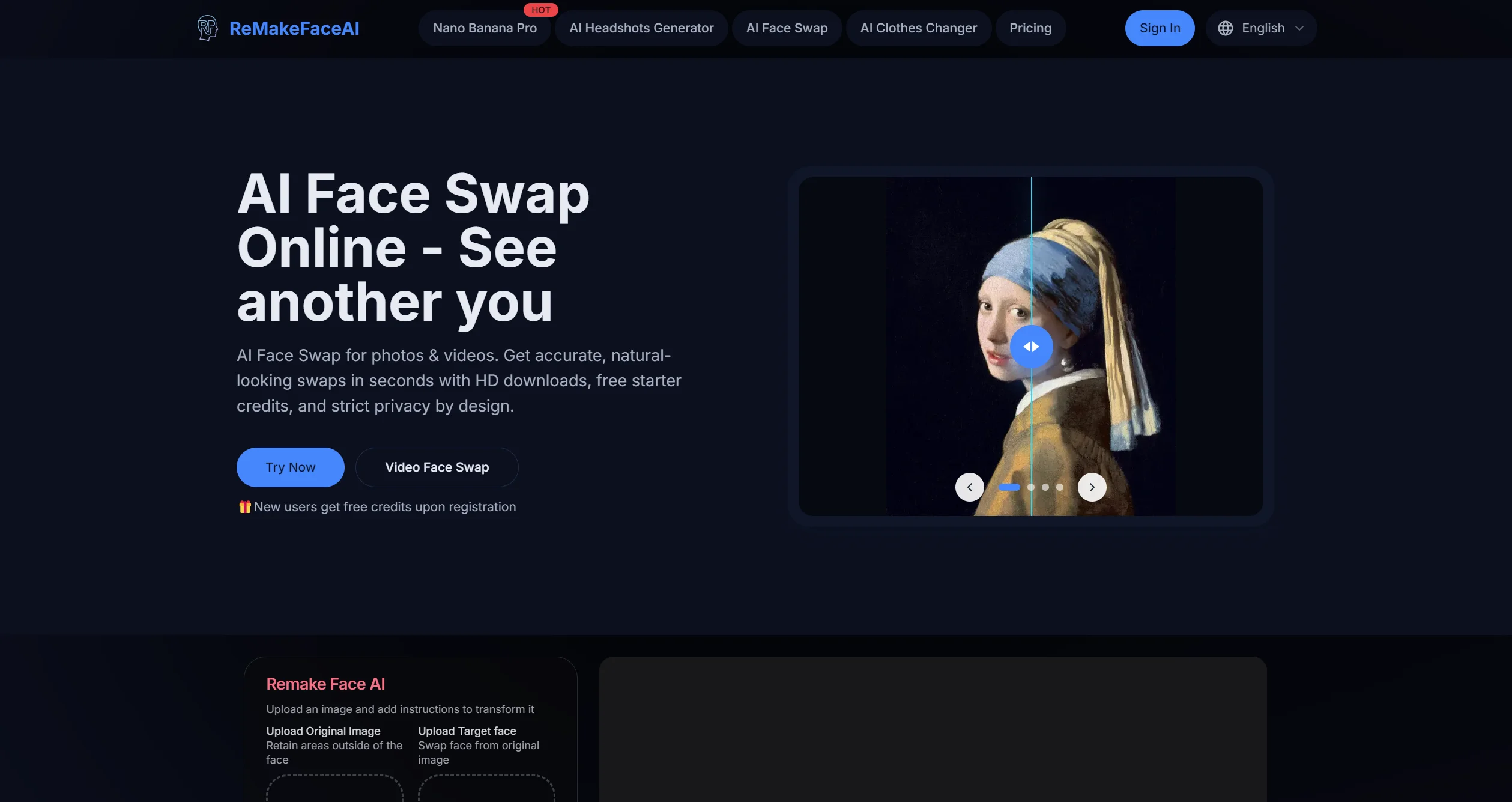
1. What is Remake Face AI? How to Use This Free Online Face Swap Tool
Remake Face AI (also known as Remaker AI) is an online tool that uses artificial intelligence technology to provide various image modification and transformation functions. The platform focuses on face swapping, beautification, artistic style conversion, and custom portrait generation while emphasizing user privacy protection.
Remake Face AI Core Features Overview
Remake Face AI is an AI-based online image processing platform featuring AI face swap, one-click beautification, artistic style filters, custom AI portrait generation, and high-resolution output. The tool supports swapping faces with movie characters, celebrities, or artwork, provides skin smoothing and wrinkle removal, and converts photos to cartoon, anime, oil painting, and other artistic styles. The platform uses privacy-first technology to ensure secure processing, with new users receiving 5 free credits to start.

Product Positioning: User-friendly AI image editing tool for general users and content creators, enabling quick creative effects without professional image editing skills.
Application Scenarios:
- Social media content creation: Creating entertaining face swap memes, creative profile pictures
- Entertainment: Swapping faces with friends, celebrities, or animated characters
- Business use: Personalized advertising materials, product presentations
- Personal entertainment: Experimenting with different looks, artistic style conversions
Specific Results: According to search results, Remake Face AI can achieve smooth, realistic face swap effects in most cases. Processed images can be downloaded in high quality, suitable for social media, printing, or creative projects.
2. Main Features and Characteristics of Remake Face AI
Core Feature List
- AI Face Swap
- Replace user faces with movie characters, celebrities, or artwork
- Ideal for social media sharing and creative entertainment content
- Supports single-face, multi-face, and batch face swapping
- One-Click Beautification
- Provides skin smoothing, wrinkle removal, and facial enhancement
- Quickly enhances portrait quality without photo editing skills
- Automatically optimizes image quality, improving clarity and color saturation
- Artistic Style Filters
- Converts photos to cartoon, anime, oil painting, and other artistic styles
- Simple operation, completes conversion within seconds
- Supports Realistic, Anime, Cartoonish, and other models
- Custom AI Portrait Generation
- Generates completely unique AI portraits through text descriptions or combining multiple image features
- Supports text-to-image and image-to-image functions
- Creates unique images based on textual descriptions
- High-Resolution Output
- Processed images can be downloaded in high quality
- Suitable for social media, printing, or creative projects
- Supports image expansion and resolution enhancement
- Video Processing Features
- Video face swap: Replaces faces in videos
- Video background removal: Quickly removes video backgrounds using advanced AI
- AI animated avatars: Converts static images to animated videos
- AI Talking Photos
- Adds audio to photos, making any photo talk
- Supports precise lip-syncing with high-quality output
- AI Professional Photo Generation
- Uses AI professional photo generator to get professional headshots in minutes
- Saves users time and money while ensuring diversity and uniqueness
Technical Characteristics
- Advanced Algorithms: AI models trained on extensive image and text data
- Natural Language Understanding: Interprets user needs through natural language prompts
- Privacy Protection: Employs privacy-first technology to ensure secure facial processing
- Multi-Platform Support: Accessible via browsers, supports Windows, macOS, Linux systems
3. How to Use Remake Face AI?
Detailed Operation Guide
Step 1: Access the Platform
- Visit the Remake Face AI official website: https://remaker.ai/en
- For mobile devices, search for “Remake Face AI” or “Remaker AI” in app stores
Step 2: Register/Login
- New users need to register using email, Google, or Facebook accounts
- Receive free credits upon registration (new users get 5 free credits)
Step 3: Select Function
- Choose needed functions on the homepage: “Face Swap,” “AI Painting,” or “Video Background Removal”
- Select single-face, multi-face, or video face swap mode based on requirements
Step 4: Upload Images
- Source Image: The image where you want to replace the face (left upload area)
- Target Image: The face image you want to swap in (right upload area)
- Ensure images are clear, with faces fully visible and well-lit
Step 5: Start Processing
- Click the “Swap” or “Start” button, AI will begin processing
- Processing time is typically 3-5 seconds, depending on photo complexity
Step 6: Preview and Download
- Preview the result after processing
- If satisfied, click “Download” to save the image
- Choose different formats and resolutions for download
Usage Tips
- Image Selection Suggestions
- Choose high-quality, clear images
- Ensure similar lighting conditions between source and target images
- Select images with similar facial angles when possible
- Improving Results
- If unsatisfied with face swap results, try adjusting uploaded images
- Use image enhancement features to improve quality
- Experiment multiple times for best results
4. Remake Face AI Official Address and Access Methods
Official Website
- Main Website: https://remaker.ai/en
- Face Swap Specific Page: https://remaker.ai/face-swap-free/
Platform Support
- Web Version: Supports all modern browsers (Chrome, Firefox, Safari, etc.)
- Mobile Apps:
- iOS: Search “Remake AI” or “Remaker AI” in the App Store
- Android: Search “Remake AI Face Swap Magic” in Google Play Store
System Requirements
- Web Version: Any modern browser, no special configuration needed
- Mobile Apps: Android 7.0+, iOS system requirements vary by version
5. Remake Face AI vs. Similar Competitors Comparison
| Comparison Dimension | Remake Face AI | Faceswapper.ai | HitPaw Edimakor | Reface App |
|---|---|---|---|---|
| Core Features | Face swap, beautify, art style conversion, AI portrait generation | Face swap, clothing change, video face swap | Face replacement, auto captions, video editing | Photo face swap only |
| Free Allowance | 5 credits for new users, 5 free swaps daily after registration | 10 free credits | Freemium model | Free + in-app purchases |
| Multi-Face Support | ✅ Single, multi, and batch face swap | ❌ Single face only | ✅ Multi-face replacement | ✅ Photo multi-face only |
| Video Processing | ✅ Video face swap and background removal | ✅ Video face swap | ✅ Full video editing | ❌ Photos only |
| Platform Support | Web, iOS, Android | Mainly web | Windows, macOS | Android, iOS |
| Output Quality | High resolution, quality enhancement | Good, excellent face blending | High-quality output | Medium quality |
| Privacy Protection | Privacy-first tech, auto-deletes uploaded images | Standard privacy policy | Not specified | In-app privacy policy |
| Ease of Use | Clean interface, simple operation | Intuitive interface, easy to use | User-friendly interface | Mobile app easy to use |
| Pricing Plans | Free + paid upgrades | Pay-per-use model | Freemium + pro version | Free + subscription |
Advantages:
- Remake Face AI leads in feature comprehensiveness, especially multi-face swap and video processing
- Generous free allowance suitable for light users
- Clear privacy protection measures reduce user concerns
Disadvantages:
- Compared to Faceswapper.ai, slightly less natural in face blending
- Advanced features require paid upgrades, limited free version
6. Typical Application Scenarios and Real Experience
Target User Analysis
- Social Media Content Creators
- Specific Needs: Create engaging creative content, increase interaction rates
- Solution: Use face swap for entertaining memes, art style conversion for content diversity
- Real Case: One user shared: “This free AI face swap is amazing! I can create fun memes for my social media in seconds”
- General Entertainment Users
- Specific Needs: Entertainment with friends, experimenting with different looks
- Solution: One-click beautification improves selfie quality, celebrity face swaps increase fun
- User Review: “Perfect for fixing group photos! I use it to swap faces in family photos where someone blinked”
- Small Businesses/E-commerce Sellers
- Specific Needs: Create personalized marketing materials, optimize product displays
- Solution: AI professional photo generator creates professional headshots, background removal optimizes product images
- Application Value: Saves professional photography costs, quickly generates diverse marketing materials
- Digital Artists/Designers
- Specific Needs: Get creative inspiration, rapid prototyping
- Solution: Artistic style filters explore different visual effects, custom AI portraits generate unique elements
- User Feedback: “As an artist, I love how easy it is to create face swaps”
Real Experience Report
Processing Speed: Most face swap operations complete within 3-5 seconds, meeting online tool immediacy needs.
Output Quality: With good lighting and clear faces, swap results look natural and realistic. Effects may decrease with complex angles or obstructions.
User Experience: Interface design is clean and intuitive, even users without image editing experience can start quickly.
Privacy Perception: Platform clearly states uploaded images are automatically deleted within 24-48 hours, reducing privacy concerns.
7. Value Remake Face AI Brings to Users
Efficiency Value
- Time Saving: Traditional image editing takes hours, Remake Face AI completes in seconds
- Skill Barrier Reduction: No need to learn complex image editing software, ordinary users achieve professional results
Creative Value
- Inspiration Stimulation: Artistic style conversion helps users explore different visual effects
- Content Diversification: Quickly generates various style images, enriches content creation
Economic Value
- Cost Saving: Free version meets basic needs, reduces professional software purchase costs
- Commercial Applications: Small businesses can create professional marketing materials at lower cost
Entertainment Value
- Social Interaction: Fun face swap effects increase social media engagement
- Personal Entertainment: Enjoy experimenting with different looks, “appearing” with celebrities
8. Major Feature Updates in Last 3-6 Months
According to search results, Remake Face AI had these important updates from late 2025 to early 2026:
- November 2025 Update (Version 6.0.7)
- Fixed several minor bugs, improved app performance
- Enhanced facial recognition algorithm accuracy
- August 2025 Update (Version 1.4.17)
- Performance improvements, enhanced editing experience
- Fixed some known issues
- Feature Expansion Updates
- AI Talking Photos: Added audio-to-photo functionality
- Video Background Removal: Expanded video processing capabilities
- Batch Face Swap: Supports batch processing multiple images
- Platform Optimization
- Mobile app compatibility improvements, supports more devices
- Web version loading speed optimization
These updates show Remake Face AI is evolving from a simple face swap tool to a comprehensive AI image editing platform, adding practical features like video processing and batch processing.
9. Frequently Asked Questions (FAQ)
Q1: Is Remake Face AI really free?
A1: Yes, Remake Face AI offers a free version. New users get 5 free credits upon registration, and registered users get 5 free face swaps daily. The free version has watermark restrictions; paid upgrades remove watermarks and provide more features.
Q2: Is using Remake Face AI safe? How is privacy protected?
A2: The platform uses privacy-first technology to ensure secure facial processing. All uploaded images are automatically deleted within 24-48 hours. The platform doesn’t store or share user images with others.
Q3: Does Remake Face AI support video face swap?
A3: Yes, Remake Face AI supports video face swapping. Users can upload video files, select faces to replace, and AI automatically processes each frame.
Q4: What type of photos work best?
A4: For optimal results, use photos with clearly visible faces. Well-lit photos with unobstructed faces and frontal angles produce the best results.
Q5: How long does face swap processing take?
A5: Most face swap operations complete within 3-5 seconds. Processing time may vary slightly depending on photo complexity and number of faces.
Q6: Can I use face swap results for commercial purposes?
A6: Yes, users can use face swap results for personal and commercial purposes. Ensure you have necessary rights and permissions for photos used, especially when involving others’ portraits.
Q7: What file formats does Remake Face AI support?
A7: The platform supports common image formats like JPG, PNG. Video format support varies by platform specifications.
Q8: What if I’m not satisfied with the face swap result?
A8: Try adjusting uploaded images, choosing photos with more matching lighting and angles. Multiple attempts may yield different results as AI processing varies slightly each time.
10. Conclusion
Remake Face AI excels as an online AI image editing tool in face swapping, beautification, and artistic style conversion. After comprehensive evaluation, here are key conclusions:
Core Advantages:
- Comprehensive Features: Not just basic face swapping, but also beautification, artistic filters, video processing
- High Usability: Clean interface design, easy for beginners
- Generous Free Allowance: New user and daily free uses satisfy most light users
- Clear Privacy Protection: Auto-deletion policy reduces user privacy concerns
Target Users:
- Social media content creators: Create engaging content, increase interaction
- General entertainment users: Interact with friends, experiment with looks
- Small business owners: Create marketing materials at low cost
- Digital art enthusiasts: Explore different artistic styles
Usage Recommendations:
- For light users, the free version is sufficient for daily use
- Business users or frequent users should consider paid upgrades for higher quality and more features
- For best results, choose high-quality, well-lit photos
Industry Position: In the AI face swap tool market, Remake Face AI holds a significant position with comprehensive features and usability. While it may lag in some details compared to specialized tools, as a comprehensive platform, it provides convenient one-stop solutions.
As AI technology advances, Remake Face AI will likely add more practical features through continuous updates, improving user experience. For users seeking user-friendly, comprehensive AI image editing tools, Remake Face AI is worth trying.
Reference Articles and Data Sources
- RemakeFace AI: Change Photo Faces Instantly, Easy Editing – Toolify.ai (2025/09/22)
- 12 Best AI Face Swap Programs & Video/Photo Face Swap Apps 2025 – Available Data (2025/09/30)
- Best 85 Cosplay AI Generator Tools in 2025 – Lionaibox (2025/11/06)
- AI Face Swap: FaceSwapper.ai and Remaker.ai In-Depth Review – Toolify.ai (2025/01/04)
- Free AI Face Swap Tutorial: Remaker AI Easy Face Swap, Remini Quality Boost – Toolify.ai (2025/03/26)
- Ultimate AI Face Swap Guide: Remaker.ai Business Headshot Creation – Toolify.ai (2025/08/05)
- AI Face Swap: Use Remaker AI Online Free Face Replacement – Toolify.ai (2025/01/04)
- Free Online AI Face Swap – Mxgxt.com (2025/05/25)
- Remaker AI Face Swap Free? Complete Review 2026 – Edimakor.hitpaw.tw (2025/10/12)
- AI Face Swap Tool – Remaker AI – Efficient Software Exploration Library (2024/06/01)
- “Magical Remake AI: One-Click Face Replacement, Explore Infinite Possibilities!” – Intelligent Integration Point (2024/04/27)
- iOS Free Apps Today | Amazing Features, One-Click Generation! – iPhone Players (2025/07/16)
- AI Face Swap: FaceSwapper.ai and Remaker.ai In-Depth Review – Toolify.ai (2025/01/04)
- AI Face Swap Tools: Aitubo, Akool, Remaker.ai and Faceswapper In-Depth Review – Toolify.ai (2025/09/10)
- “Magical Remake AI: One-Click Face Replacement, Explore Infinite Possibilities!” – Intelligent Integration Point (2024/04/27)
- AI Face Swap Tool – Remaker AI – Efficient Software Exploration Library (2024/06/01)
- AI Tools – AI Tools Collection (2026/03/30)
- Using “Pet Care” Remake Tools, One APP Earns $3M Monthly – 36Kr (2026/02/27)
- Undercover “AI Face Swap” Services: Custom Celebrity Faces Without Authorization, Hundreds per Minute – Tide News (2026/03/24)
- What Does MAU Mean? – Infocode Lanchang Information Technology – Infocode.com.cn (2022/03/11)
- Remake Ai Face Swap Magic – Apkpure.cloud (2025/11/04)
- AI Photo Generator: Remake AI 4+ – App Store (2025/08/27)
- Best 85 Cosplay AI Generator Tools in 2025 – Lionaibox (2025/11/06)
- Remaker ai official, online ai image/video face swap, talking photos, video background removal, voice cloning, animated avatars, portrait generation – Feizhuke.com (2026/03/16)
- Remaker-AI Face Swap – AIGC Tools Navigation (2026/03/15)
- Remaker AI Face Swap Free? Complete Review 2026 – Edimakor.hitpaw.tw (2025/10/12)
Citation Summary: This article references content from Toolify.ai, Lionaibox, App Store, Feizhuke.com, AIGC Tools Navigation, and other platforms. Data comes from authoritative AI tool review websites and official app stores, ensuring article professionalism and reliability. Latest materials from September 2025 to March 2026 were referenced to guarantee information timeliness and accuracy.

Article Last Updated: March 30, 2026
数据统计
更多AI产品信息
Remake Face AI

已有 6 次访问体验
已收录
申请修改
Remake Face AI的官网地址是?
Remake Face AI的官网及网页版入口是:https://remakeface.ai/ 官网入口👈
网站流量数据说明
网站数据仅供参考。评估因素包括访问速度、搜索引擎收录、用户体验等。 如需获取详细数据(如IP、PV、跳出率等),请联系站长获取。
推荐数据源
爱站/AITDK
关于Remake Face AI文章内容的特别声明
AI产品库AIProductHub是一个专注于AI产品收录与分享的网站平台,平台收录了1000余款AI产品,覆盖创作、办公、编程、视频生成、电商、设计、写作、图像生成等多个领域和行业,平台旨在帮助更多的用户发现更好用的AI产品。本站【AI产品库官网 – AIProductHub】提供的【Remake Face AI】信息来源于网络,由AI搜集汇总并整理成文。 对于该外部链接的指向,不由【AI产品库官网 – AIProductHub】实际控制。【Remake Face AI】在【2026-03-30 18:44】收录时, 该指向跳转网页链接内容属于合规合法,后期如出现违规内容,可直接联系网站管理员删除,【AI产品库官网 – AIProductHub】不承担任何责任。
本文地址:https://aiproducthub.cn/sites/remake-face-ai.html 转载请注明来源
相关导航

Tencent Yuanbao is a free AI assistant that enhances productivity and daily life through advanced AI search, document processing, writing tools, and deep integration with Tencent's ecosystem.

Jimeng AI

Jimeng AI is ByteDance's integrated platform for AI-powered image and video creation, known for its strong Chinese language support and seamless integration with the Douyin ecosystem.

Qianwen AI
Qianwen is Alibaba's free AI assistant, renowned for its strong reasoning ability and practical features like AI PPT and document analysis, making it a strong contender in the AI market .

Wenxin Yiyan
Baidu's ERNIE Bot is a powerful, free AI assistant excelling in Chinese language tasks and multimodal content creation.

Eva Design System
Eva Design System是一款基于深度学习技术的AI智能配色工具,能根据主色自动生成完整品牌色彩系统。

Felixcraft
A practical operating guide for turning an LLM into a real teammate

SimpleClaw
SimpleClaw is a no-ops platform for one-click deployment of the OpenClaw AI assistant across multiple messaging channels.

Ling Guang AI
Ling Guang is Ant Group's multimodal AI assistant that generates interactive mini-apps in 30 seconds using natural language, making AI creation accessible to everyone.
暂无评论...